Checkout is paused for a short while for maintenance. Your cart is saved: please check back soon.
Help topic 4 of 10
Shipping rates and carriers
Shoppers pay shipping on your items only, once per order, even when their cart has items from other stores. Set it up once and it works for every order.
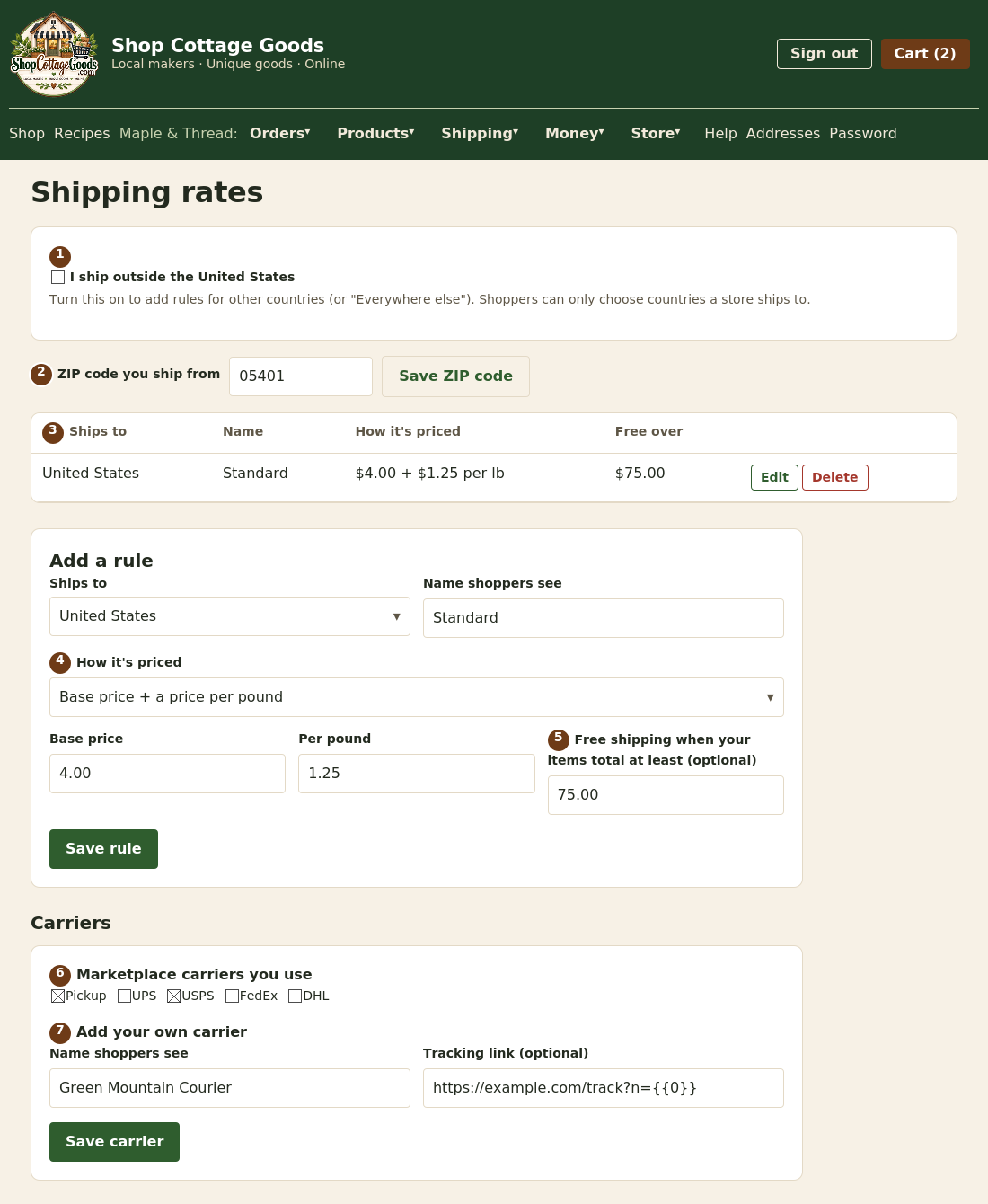 The numbers match the steps below. Select the picture to see it full size.
- Optional: tick I ship outside the United States to sell to other countries. You ship within the United States until you do, and
shoppers can only choose countries some store ships to. Turning it off keeps your other-country rules but stops using them.
- Enter the ZIP code you ship from and select Save ZIP code. Live carrier prices are worked out from it.
- Your shipping rules: start with one for the United States. If you ship internationally, add one per country, or one for Everywhere else; a rule for a specific country overrides Everywhere else. Shoppers in a country with no rule can't have your items shipped (they can still choose market pickup).
- Choose how it's priced (see the table below).
- Optional: free shipping when your items in the order total at least this much, after promotions.
- Under Carriers, tick the marketplace carriers you use, then Save carrier choices. These appear when you mark an order shipped,
and if you price shipping with Live carrier rate, shoppers are only quoted the cheapest rate from these carriers.
- To add your own carrier, such as a local courier, enter its name and, if it has one, its tracking link with
{0} where the tracking number goes. Untick Needs a tracking number for carriers without one. Only your store sees your own carriers.
Local delivery
Deliver to nearby shoppers yourself: under Local delivery, tick I deliver locally and set up to 5 levels.
Each level is up to how many miles from your ship-from ZIP, for orders of at least an amount (your items after promotions),
and the fee. Shoppers pay the cheapest level that fits; if none fits, they see why (too far, or the order is too small).
Add a note such as your delivery days. Distance is a straight line between ZIP codes, so allow a little extra for driving.
| How it's priced | Example | Shopper pays |
|---|
| One flat price per order | $6.00 | $6.00 |
| Base price + a price per item | $4.00 + $1.50 per item, 3 items | $8.50 |
| Base price + a price per pound | $4.00 + $1.25 per lb, 2.4 lb (rounded up to 3 lb) | $7.75 |
| Live carrier rate | The carrier's cheapest price, plus your base price as handling | Worked out at checkout |
Porch pickup
Let shoppers collect orders from your porch (or a similar spot) any time during your hours. Under Porch pickup on the
Shipping page, tick Customers can collect orders from my porch and enter the address, your pickup hours, any instructions
(like where the bins are) and a fee, or 0 for free. Before paying, shoppers see only your town; the address, hours and instructions come
with their order confirmation.
When an order is ready, open it on the Orders page, choose Bin, Bag or
Mailbox, type its number and tap Ready for pickup. The customer is emailed, for example,
Look for Bag 12, with your address and hours, and the number shows as the order's tracking. Put it somewhere else? Change it and tap
Update and re-send. When it's been collected, tap Mark picked up to release your payout. If it's never
collected, use Customer no show, as for market pickups. Cottage food items can only be collected in your home state.