Checkout is paused for a short while for maintenance. Your cart is saved: please check back soon.
Help topic 5 of 10
Market pickups
List the dates you'll be at a market, and shoppers can choose free pickup instead of shipping. You get a printable list of who's coming.
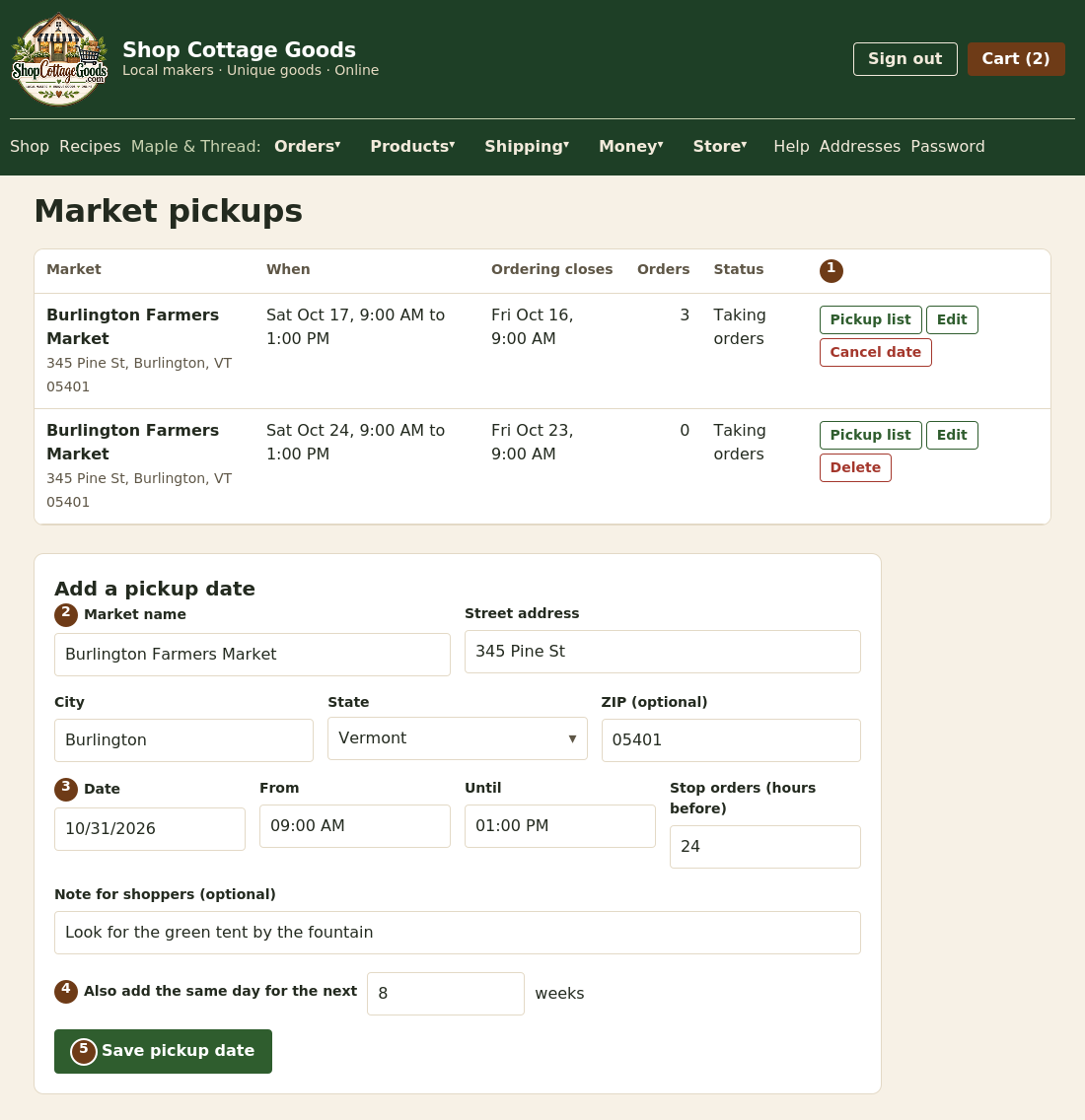 The numbers match the steps below. Select the picture to see it full size.
- Your upcoming dates. Pickup list shows each order, the customer's name and phone, and the items to bring. A date with no orders can be deleted; one with orders can only be cancelled, and those shoppers stay on its list so you can contact them.
- Enter the market name and its address.
- Choose the date, the from and until times (local to the market), and when to stop orders: ordering closes this many hours before the start (24 to begin with).
- Same market every week? Enter how many more weeks under Also add the same day for the next … weeks (up to 26).
- Select Save pickup date. The form keeps the market's details, so adding another date is quick.
On the day
- Shoppers get a reminder email the day before.
- When someone collects, select Mark picked up on your Orders page. That releases your payout.
- If someone doesn't come, use Customer no show on the order (topic 7).
Good to know: pickup orders are taxed at the market's state, and cottage food can only be picked up at markets in your home state.