Checkout is paused for a short while for maintenance. Your cart is saved: please check back soon.
Help topic 8 of 10
Get paid
You're paid for each order when you mark it shipped or picked up. Your Payouts page shows your fees, every payout, and a form for questions.
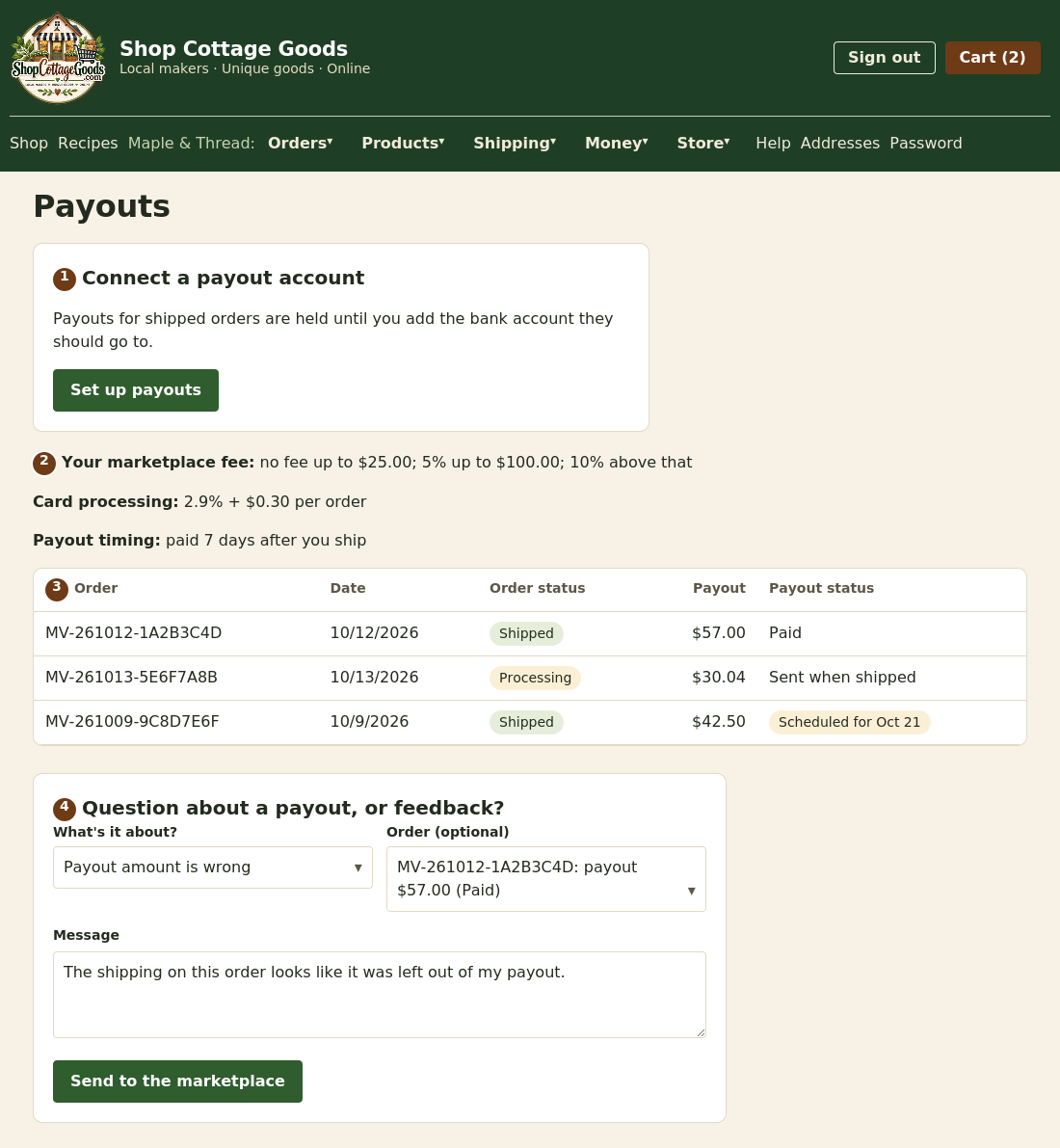 The numbers match the steps below. Select the picture to see it full size.
- Connect your bank: select Set up payouts and follow the payment provider's steps. Only the store's owner can do this. Until then, payouts are held, then sent automatically.
- Your fees: the marketplace fee (a percentage of your items, by order size) and card processing. Your exact rates are shown here,
with your payout timing: straight away when you ship, or a set number of days later (up to 30), as agreed with the marketplace.
- Your payouts: one row per order, with its status (see below).
- Questions or feedback: choose what it's about, optionally the order, and send it. You'll get a copy with a reference number, and a reply by email.
An example payout
| Your items after promotions | $56.00 |
| Shipping the shopper paid you | + $6.00 |
| Marketplace fee (5%, because $56.00 is between $25.01 and $100.00) | − $2.80 |
| Card processing (2.9% of $65.36 paid, including $3.36 tax, + $0.30) | − $2.20 |
| Your payout | $57.00 |
Uses the default fees; yours are on your Payouts page. The tax ($3.36) is kept by the marketplace, which pays it to the state, unless you set your own tax rates (topic 9).
Payout statuses
- Sent when shipped: waiting for you to mark the order shipped or picked up.
- Scheduled for (date): shipped; it's paid automatically on that date (your payout timing).
- Paid: sent to your account.
- Waiting for payout account: connect your bank to release it.
- Failed, the marketplace will retry: the payment provider rejected it.
- Reversed or Not due (refunded): the order was refunded.
Reports
Reports > Product reports has two reports for any dates, in order of product name, SKU or UPC, and each downloads for
Excel: Product sales lists every product sold in each order with its price, discount, tax, marketplace fee, card processing,
your payout and the order's status; Product movement shows units sold, refunded and net for each product, with what's in stock now.
Your subscription
Your Subscription page shows your plan and the date it's paid through. To renew, choose a plan; it's added to your cart for checkout,
and renewing early adds time on top of what's left. Have a coupon code? Enter it under Have a coupon code?
on the same page to add free time; each code can be used once per store. You're emailed 7 days before it ends. If it lapses, your products stay in the shop for 3 more
days, then leave it until you renew. You can always ship existing orders.